3-in-1 Soft Silicone AirPods Max Protector: No-Bulk Guard
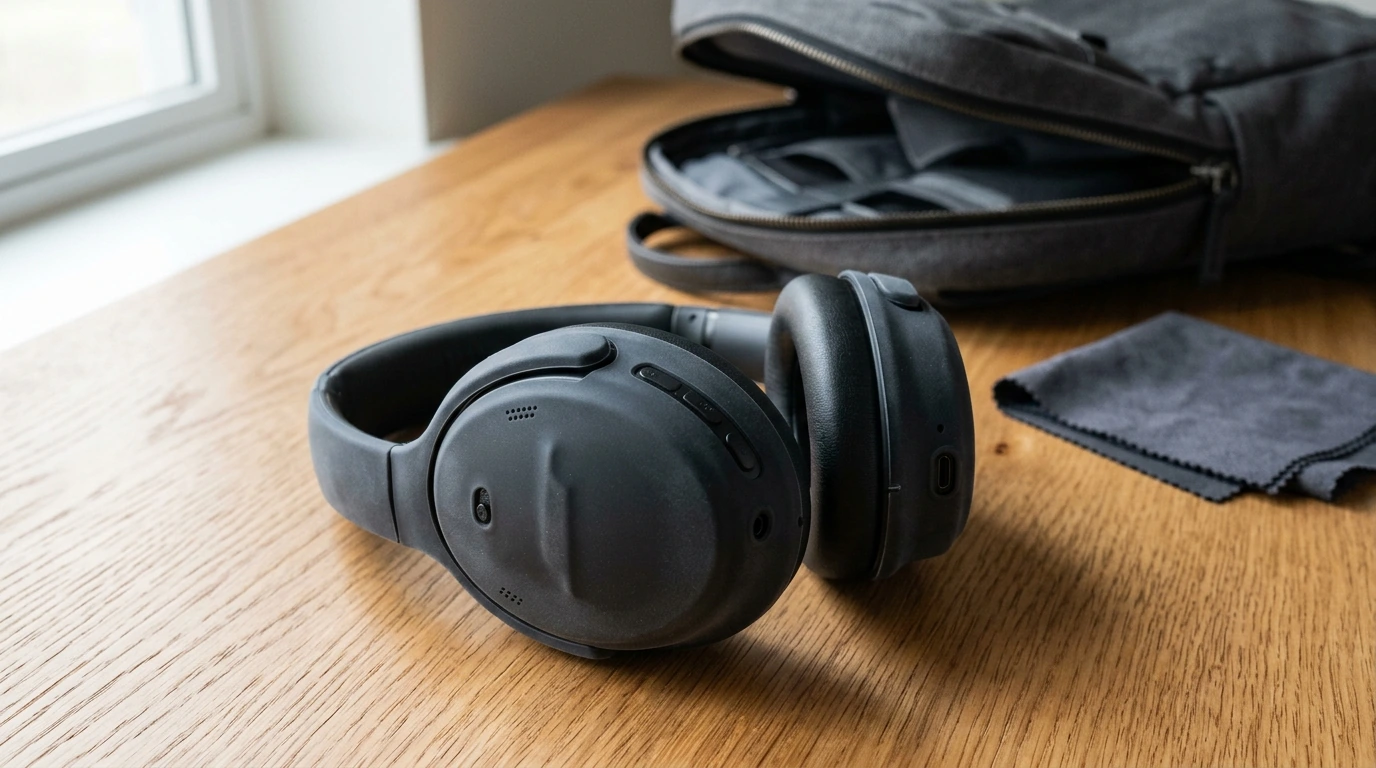
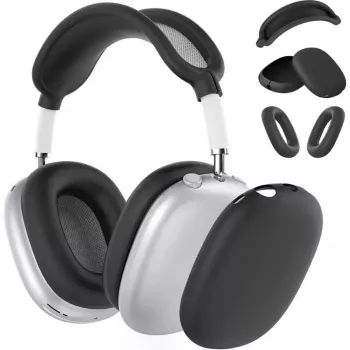
3-in-1 Soft Silicone Protector Case for Apple AirPods Max
AirPods Max are built to look and feel premium, but daily life can be hard on any headphone finish. Scuffs from bags, light rub marks from desk surfaces, and fingerprints from frequent handling can add up over time. A 3-in-1 soft silicone protector set helps cover key exterior contact points with a flexible layer that stays comfortable to hold and is easy to remove and clean when needed.
Why a silicone protector makes sense for AirPods Max
Soft silicone is a practical match for over-ear headphones because it adds protection without turning the headset into a bulky hard-shell accessory. For AirPods Max, a properly fitted silicone set can help reduce visible wear while keeping everyday use simple and familiar.
- Helps reduce visible wear like small scratches and rub marks from bags, desks, and frequent handling
- Adds a slightly grippier surface that can feel more secure when picking up or setting down the headphones
- Acts as a barrier against fingerprints and light smudges for a cleaner everyday appearance
- Offers a simple way to refresh the look of AirPods Max without changing how they operate
Before ordering any accessory, it’s smart to confirm you’re shopping for the correct model. Apple’s AirPods Max technical specifications page is a helpful reference for the hardware and general design details.
What “3-in-1” typically covers
“3-in-1” usually means you’re getting multiple coordinated silicone pieces rather than one single wrap-around cover. The idea is to protect the parts that most often touch surfaces or get bumped during normal use, while keeping the headphone’s original form factor and controls accessible.
- A set of silicone components designed to protect multiple exterior parts rather than a single cover
- Coverage intended for common contact points that tend to collect scuffs during daily use
- A coordinated fit so the pieces look consistent once installed
- A practical option for users who want protection without a hard shell feel
Fit and compatibility details to confirm before buying
Fit is everything with AirPods Max accessories. A protector should sit flush, align around curves, and avoid interfering with the listening experience or the physical controls.
- Designed for Apple AirPods Max (over-ear headphones); verify the model matches AirPods Max rather than AirPods or AirPods Pro earbuds
- A good fit should sit flush without blocking controls, microphones, or vents
- Look for edges that align cleanly around curves to avoid peeling during handling
- If using a separate carrying case, ensure the added layer doesn’t create tight spots when storing
Everyday protection benefits
Silicone protectors are mainly about day-to-day peace of mind. They’re especially useful when headphones are moved between home, office, and travel setups where they can brush against other items.
- Scratch and scuff resistance for day-to-day surfaces like tabletops, backpacks, and commute gear
- Helps reduce minor cosmetic dings from gentle bumps
- Soft-touch silicone can dampen small impacts better than bare metal in light contact scenarios
- A removable layer that can be replaced more easily than repairing cosmetic wear
It’s best to treat silicone as a cosmetic and light-impact buffer rather than a full “drop-proof” solution. Pairing a protector with careful storage habits is still the safest approach.
How to install for a clean, secure finish
Taking a couple of minutes to install carefully can make the protector look seamless and help it stay put over time.
- Wipe down the exterior with a soft, lint-free cloth before applying any silicone parts
- Install one piece at a time, aligning openings carefully around buttons and seams
- Press along the edges to seat the silicone evenly and reduce lifting over time
- If an edge shifts, remove and re-seat rather than stretching aggressively to avoid warping
Care and cleaning
Silicone is low maintenance, but occasional cleaning keeps it looking fresh and helps prevent grit from rubbing against the headphone surface.
For general guidance on cleaning wearable audio gear, Apple’s support article on how to clean AirPods and earbuds provides safe, conservative cleaning principles that also apply well to headphone surfaces and accessories.
Quick specs and buying checklist
| Item to check | What to look for | Why it matters |
|---|---|---|
| Model compatibility | AirPods Max | Avoids poor fit and blocked openings |
| Material feel | Soft silicone | Comfortable grip and flexible installation |
| Coverage design | Multi-piece (3-in-1) | Protects more than a single contact point |
| Openings and access | Aligned cutouts | Keeps controls and microphones unobstructed |
| Cleaning routine | Soap + water safe | Maintains appearance over time |
Who this set is best for
Product options available
- 3 in 1 Soft Silicone Protector Case for Apple Airpods Max ($11.99)
- hand-crocheted-cotton-triangle-scarf-headband-vintage-style-hair-accessory-for-women ($11.77)
- led-illuminated-pet-nail-clipper-with-anti-splash-guard ($12.77)
FAQ
Will a silicone protector affect the buttons or sound quality on AirPods Max?
A properly fitted silicone protector should not affect sound quality or button operation because it shouldn’t block controls, microphones, or vents. If anything feels obstructed, remove the piece and re-seat it so the cutouts align cleanly.
How do you clean a soft silicone protector case?
Remove the silicone pieces, wash them by hand with mild soap and water, rinse thoroughly, and let them air-dry completely before reinstalling. Avoid harsh chemicals that can break down silicone or dull the finish underneath.
Does silicone protection prevent all damage from drops?
Silicone can help reduce scuffs and soften very minor impacts, but it won’t guarantee protection from significant drops or crushing force. For best results, handle with care and store AirPods Max in a safe spot when not in use.












Leave a comment